












Skip to content
  • Solutions
  • Products
  • Resources
  • Support
  • Company
  • Contact
  • Home
  • Solutions
  • Products
  • Resources
  • Support
  • Company
  • Home
  • Solutions
  • Products
  • Resources
  • Support
  • Company
Shop Now
Computer Testing Needs for Manufacturing

Scoping out new PC designs, building golden samples or ready for production.

Computer Testing Needs for Refurbishing

Determining PC asset value throughout usable lifecycles, deciding which systems…

Computer Testing Needs for Services

Welcome to the world of computer issues and often product returns…

Computer Testing Needs for Support

Let’s extend our gratitude to the dedicated teams that keep our PCs running smoothly 24/7.

Government and Public Sector Computer Reliability

No matter which government sector or service you’re in, computer reliability can only be assured when you use comprehensive software tools

Find the Best Diagnostic and Data Erasure Solution

Not sure which software will give you the results you need? 

Start Here
  • Diagnostics
  • Data Erasure
  • Management Tools

Pc-Check® Windows®

Pc-Check® MultiMode™

Pc-Check® UEFI + Arm®

Pc-Check® Windows® + ZeroData™ Windows®

Pc-Check® UEFI Embedded Fixed Disk & BIOS

Pc-Check® Self-boot

Diagnostic Test Accessories

Computer Diagnostic Tests

ZeroData™ Windows®

Pc-Check® Windows® + ZeroData™ Windows®

ZeroData™ Windows® - Erasure Compliance Methods

PC Builder™ Software Introduction

PC Builder™ Software for Manufacturing

PC Builder™ Software for Refurbishment

Government and Public Sector Computer Reliability
Learn More
PC Diagnostic & Data Erasure Software Comparison
Learn More
UEFI Hardware Diagnostics Resource
Learn More
Secure Data Erasure Guide 2026
Learn More
Eurosoft Software Subscription FAQ's
Learn More

Latest News

News
Updates

Help us to identify your support request.

Purchasing Questions and Answers? Registering your Eurosoft product? Technical issue?

Learn More

Eurosoft Office Hours

UK Office
Monday – Friday
8:30AM – 5:30PM

US Office
Monday – Friday
8:00AM – 5:00PM EST/CST

Contact Us

  • UK Tel: +44 (0)1202 297 315
  • US Tel: +1 (712) 255 7483

Find support Fast

Frequently Asked Questions
Support Portal
Support Ticket
Diagnostic Product Registration
Product Announcements
About Eurosoft
Latest News
Testimonials
Terms & Conditions
Employment
Representatives

Eurosoft Offices

Eurosoft (UK) Ltd
Head Office
3 St. Stephen’s Road
Bournemouth
BH2 6JL
England

Email info@eurosoft-uk.com

Tel +44 (0)1202 297315
Fax +44 (0)1202 558280

Eurosoft (US) Inc.
2635 S Palmetto St.
Sioux City,
IA 51106
United States of America

Email info@eurosoft-us.com

Tel +1 (712) 255 7483
Fax +1 (866) 615-9384

Our Offices
  • Home /
  • News /
  • Blog IT /
  • Blog: Memory issues with AMD motherboards

Blog: Memory issues with AMD motherboards

Recently there was an issue reported by a customer regarding memory not being detected or working correctly on motherboards with the AMD A55M chipset.

This issue discussed in this case is related to both the features and settings of the memory module, the features and settings in the motherboard BIOS, and how these can effect memory testing on 1600 spec memory on motherboards with the AMD A55M chipset.

The motherboard maker AMD recommends verifying that AMP, DOCP or XMP is enabled in the BIOS. This functionality will make sure correct SPD memory information (latency, frequency, voltage) provided by DIMM module vendor and/or AMD motherboard are setup correctly. This functionality will be provided on FX, APU and SoC parts.

  • A.M.P. (profile set by AMD)
  • D.O.C.P. (profile set by motherboard vendor)
  • X.M.P. (profile set by memory vendor)

It is known that these setting are only implemented in BIOS using the latest AGESA code supplied by AMD.

The memory supplier in this case acknowledged that the main issue encountered with AMD motherboards and memory compatibility was that all the modules have neither XMP nor AMP support.”

The memory supplier also reported that it is possible in some cases to get failing memory to work by…

  1. Lowering the DRAM frequency to 1333MHz can boot up all the failed kits. (Native DRAM frequency is 1600MHz).
  2. Pushing the DRAM voltage to 1.65V can boot up some of the failed kits.

But this was not successful in all cases.

So in this case,  in order to for 1600 spec memory to work properly on motherboards with the AMD  A55M chipset, the motherboard needs to support  AMP, DOCP, and XMP, these features need to be enabled in the BIOS settings, and the memory modules must also support and be set with these features.

Did someone say features?

So what is XMP? It’s something that the over clockers have been doing to get more performance.

XMP (Extreme Memory Profile) is basically a non-JEDEC approved SPD table for your RAM that is programmed into the sticks. By setting XMP you can run the sticks at their RATED speed and timings even if it requires more vDIMM to do so.

For example…
1333 MHz 9-9-9 @ 1.5v is JEDEC standard
Most kits will do 1600 9-9-9 at 1.6V

AMP is AMD Memory Profile

AMD Memory Profile (AMP) enables the performance tuning of DDR3 memory modules beyond standard JEDEC (Joint Electron Devices Engineering Council) specification.

EPP is Enhanced Performance Profile

This is essentially the implemented on Intel chipsets and again is used by over clockers to increase the memory performance on chipsets that support it.

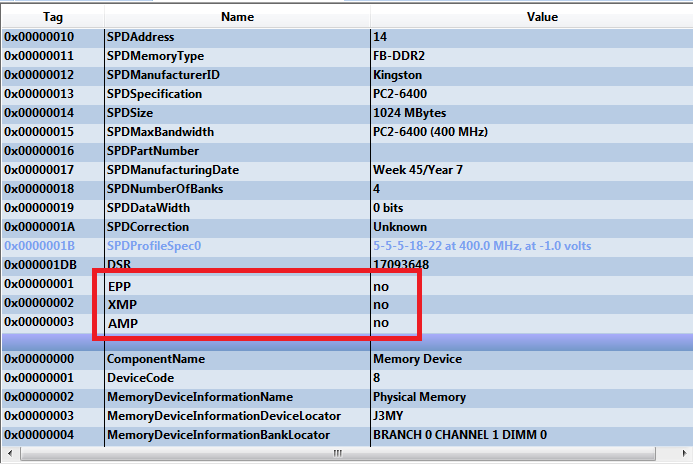
In order to aid identification of this issue Eurosoft has updated its library for gathering the information associated with the memory components, the memory information now shows if these features are present and enabled.

Note: If XMP is not enabled there will be stability issues on AMD A55 Chipset with 1600 Spec memory.

This example log entry shows how Eurosoft now displays EPP, XMP, and AMP status in QA+Win.
news-amd-and-memory-issues-1

(PC Builder users can now automatically detect and fail machines when these settings are detected to be disabled.)

Identifying issues that can arise with various BIOS settings and memory configurations can be stressful. Eurosoft has made it easier with the addition of EPP, XMP, and AMP status information.

Eurosoft have now added these items to the system information in QA+Win, this applies to versions 10.6.0.98 and greater.

Quick View

Buy Now

Eurosoft Online Shop

Discover our limited-time offers and get the tools you need today.

Available exclusively on our online shop.

View Shop

Testimonials

See how professionals worldwide trust Eurosoft – read their stories and results.

All Testimonials

Latest News

How to Find PC Hardware Faults Faster with Diagnostic Testing
How to Find PC Hardware Faults Faster When a PC crashes, freezes, overheats, slows down, or refuses to...
Pc-Check® Windows® V3.5.4.0004 New Release
More Arm testing with Pc-Check® Windows® V3.5.4.0004 using Windows emulation on all kinds of devices...
Pc-Check UEFI V2.00 Release
Twist my Arm – so new testing for the Arm® platform arose – test cover for motherboard, CPU, RAM, TPM,...
No posts found

Contact Us

  • UK Tel: +44 (0) 1202 297 315
  • US Tel: +1 (712) 255 7483
Contact Us

Registered Head Office:

Eurosoft (UK) Ltd

3 St Stephen’s Road
Bournemouth
BH2 6JL

United Kingdom

US Office:
Eurosoft (US) Inc

2635 S Palmetto St.
Sioux City
IA 51106
USA

Facebook Linkedin X-twitter

Products

  • Pc-Check® UEFI + ARM
  • Pc-Check® Windows®
  • Pc-Check® Self-boot
  • Pc-Check® MultiMode™
  • Pc-Check® + ZeroData™ Windows®
  • ZeroData™ Windows®
  • PC Builder™ Software Test Management Suite Introduction
  • Diagnostic Test Accessories

Solutions

  • Computer Manufacturing
  • Computer Refurbishment
  • Computer Services
  • Computer Support
  • Government and Public Sector Computer Reliability

Support

  • Support Home
  • FAQ's
  • Support Ticket
  • Product Registration
  • Our Ofiices
  • Contact Eurosoft

Copyright © 2026. All Rights Reserved  Eurosoft (UK) Ltd | Terms & Conditions